Home
Knowledge Base
FAQs
Home
Knowledge Base
FAQs
User Devices
Home
/
Knowledge Base
/
Computers & Technology
/
User Devices
Updating your St Luke’s Password in Mail
January 23, 2014
/
October 19, 2018
/
Alison Cassidy
To update your St Luke’s password in Mail on your iPad
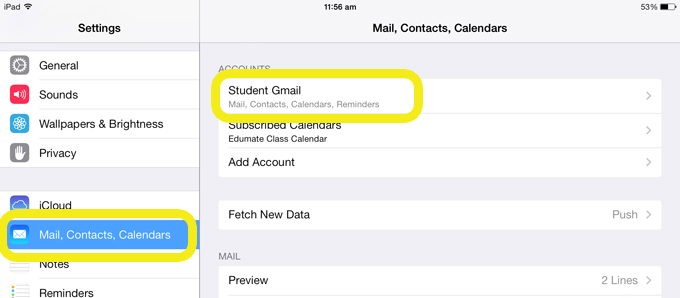
Open the Settings app
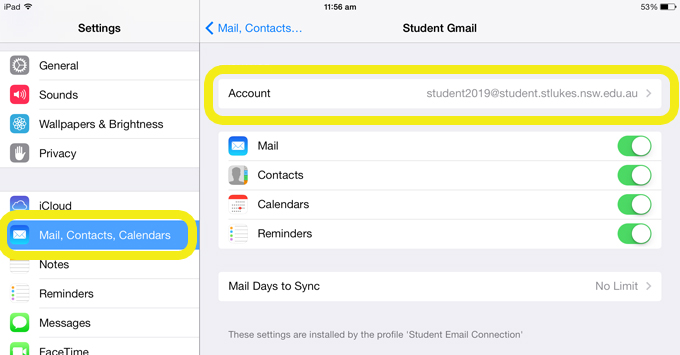
Select Mail, Contacts, Calendars then select your student email account
Select Account
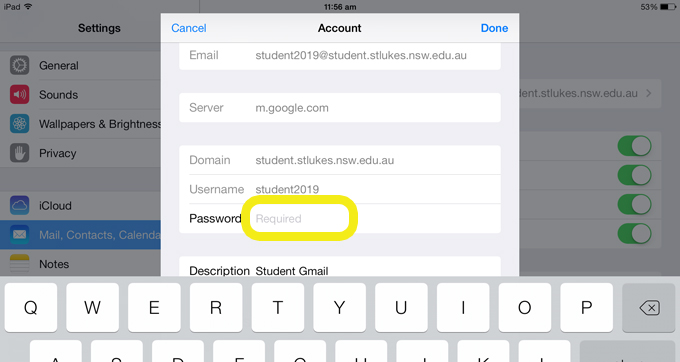
Enter your new password, then select Done
TAGS:
email
password
RELATED ARTICLES
Edumate – Email Parents Through Edumate
Canvas – Conferences
Canvas – Pinned Discussion
Canvas – Notification Settings
SchoolBench