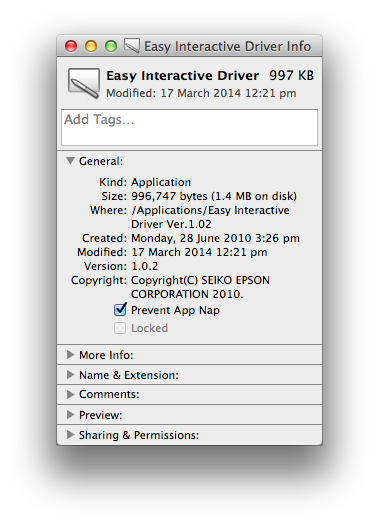
Apple’s OS X Mavericks (10.9) and Yosemite (10.10) operating systems included a feature called “App Nap”. This feature was intended to improve battery performance for the Apple Macbooks, but this has caused a problem with the Epson Interactive Pen driver.
If you are experiencing problems using the interactive pen in the classroom on your Apple laptop, please follow these steps to turn off “App Nap” for the Epson driver software:
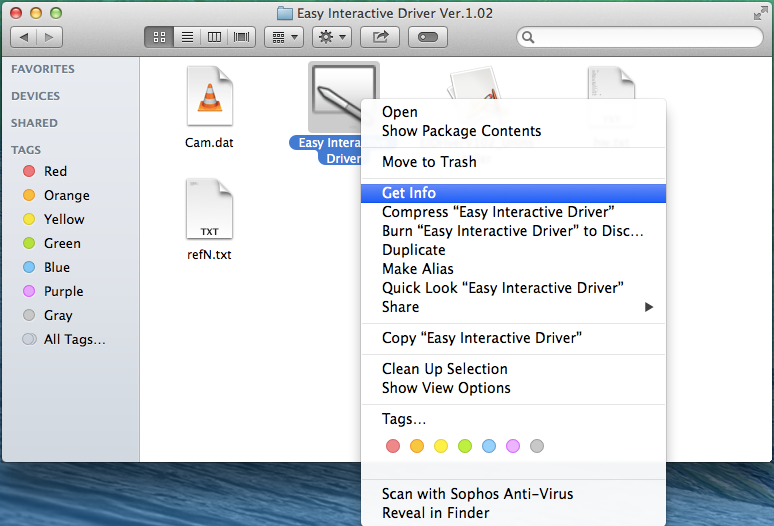
- Open Finder and go to the “Applications” folder
- Open the “Epson Interactive Driver 1.02” folder
- Right-click on the “Easy Interactive Driver” icon
- Click on “Get Info”
- Tick the “Prevent App Nap” option